Ambient
Field manual
◆ MMC Molo Modding · Vol. 01
FiveM resource · v1.0.0 · 2026
Molo Modding · Vol. 01

Mars Project

A field manual for the unified Mars colony framework
◆ MMC 01 — What's inside
Field manual

One resource, ten modules

Molo Mars Core consolidates five separate Molo Modding resources into a single, module-toggleable framework.

Access & transit
  • Lift Multi-floor pod elevator
  • Doors Animated airlock doors
  • Car Lift Vehicle bay with DUI
  • Teleporter Earth ↔ Mars cinematic
Life support
  • Airlock Depressurization chamber
  • Suit Spacesuit, O₂ & HUD
  • O₂ Stations Recharge machines
World & motion
  • Weather Forced clear sky
  • Storm Dust storm + wind zones
Ambient
  • Soundscape Ambient looped audio
◆ MMC 02 — Quick start
Field manual

Four steps to launch

01
Drop the folder
Place molo_mars_core in your resources/ directory.
02
Ensure the resource
Add ensure molo_mars_core to server.cfg, after ox_lib and ox_target.
03
Pick your modules
Open config/main.lua and toggle off anything you don't need.
04
Tune the coordinates
Adjust the per-module config files to match your MLO.
Dependencies: ox_lib and ox_target. Required by most modules — kept in fxmanifest by default.
◆ MMC 03 — Maps included
Field manual

Two maps ship with Molo Mars Core

Both are required out of the box. Zancudo can be removed if you don't need the Earth-side launch pad — instructions below.

molo_mars
The Martian colony
Coordinates
7395.19434, 1189.60754, 1592.99
All ten modules are anchored to this map. Cannot be removed.
molo_zancudo
Earth-side launch pad
Coordinates
−1862.82349, 3330.8667, 32.80922
Required by default — it's where the teleporter sends you back from Mars. Optional only if you remove the teleporter module.
Removing molo_zancudo (optional)
  1. Stop including molo_zancudo in your server.cfg (remove or comment the ensure line).
  2. Open client/teleporter.lua and disable the script — either delete the file, comment out its body, or set its toggle to false in config.lua.
  3. Restart the server. Players will start directly inside molo_mars (no Earth ↔ Mars cinematic).
◆ MMC 04 — Module toggles
Field manual

One switch per module

Every module has a one-line switch in config/main.lua.

config/main.lua
-- Toggle any module to false to disable completely.
Mars.Config.Modules = {
    Lift        = true,   -- Multi-floor pod elevator
    Doors       = true,   -- Animated airlock sliding doors
    CarLift     = true,   -- Vehicle bay with DUI screen
    Airlock     = true,   -- Depressurization chamber
    Suit        = true,   -- Spacesuit + O2 drain
    O2Stations  = true,   -- Ox_target recharge machines
    Weather     = true,   -- Force CLEAR weather + time
    Soundscape  = true,   -- Ambient looped audio
    Storm       = true,   -- Dust storm + wind zones
    Teleporter  = true,   -- Earth ↔ Mars cinematic
}
◆ MMC 05 — Module index
Modules

The ten modules at a glance

ILiftMulti-floor pod elevator
IIDoorsAnimated airlock sliding doors
IIICar LiftVehicle bay with DUI screen
IVAirlockDepressurization chamber
VSuitSpacesuit, O₂ drain & HUD
VIO₂ StationsRecharge machines
VIIWeatherForced clear sky in zone
VIIISoundscapeAmbient looped audio
IXStormDust storm + wind zones
XTeleporterEarth ↔ Mars cinematic
— FIN —
◆ MMC 06 — Lift pod
Modules

Multi-floor pod elevator

An anti-fall pod that ferries players between Mars colony floors.

MoveTimeSeconds per floor (default 4.0)
Floors[]List of { id, label, indicator, z }
AnchorX / AnchorYLift's fixed XY position
ThemeMenu colors (header, items, glow)
config/lift.lua
-- Default Mars colony floors
C.Floors = {
  { id=1, label='Ground Station',    z=1566.32 },
  { id=2, label='Habitat Module',    z=1570.03 },
  { id=3, label='Command Center',    z=1575.65 },
  { id=4, label='Excavation Site',   z=1546.92 },
}
◆ MMC 07 — Airlock & doors
Modules

Sealed entry, animated

Two cooperating modules. Doors handles four sets of sliding airlock doors. Airlock chains them with a depressurization timer.

Doors module
4 door sets · OpenSpeed 3 s · AutoCloseDelay 5 s · ox_target
Airlock module
DepressTime 5 s · steam PTFX · outer + inner terminals
Both share spawn / despawn distance defaults of 150 m / 180 m.
◆ MMC 08 — Vehicle bay
Modules

Car Lift

A vertical platform with an animated door and a DUI screen showing the available vehicles.

Vehicles[]{ model, label, class }
PlatformposDown / posUp · moveSpeed 3.0
ScreenDUI 512×512 on prop texture
AlarmRed blinking light, no prop
config/carlift.lua
VEHICLE BAY · DUI 512×512
Scarab · Zhaba · Verus
◆ MMC 09 — Life support
Modules

Suit & oxygen

Two modules sharing a common state.

Suit
0.30 O₂/s with suit · 3.0 O₂/s without · breathing sound
O₂ Stations
ox_target rechargers · 5 s recharge · cyan VFX
◆ MMC 10 — World & ambient
Modules

Weather, soundscape, storm

Three modules that paint the world.

Weather
CLEAR · hour 23 · 600 m radius
Soundscape
Looped ogg · room-gated · fade in/out
Storm
Deadly line + 11 wind zones · 50% slowdown
◆ MMC 11 — Teleporter
Modules

Earth ↔ Mars cinematic

Two markers, one MP4. The Lua side waits for the browser's video.ended event before completing the teleport.

Point A — Earth (Zancudo)
−1862.82
−1862.82349, 3330.8667, 32.80922
Point B — Mars
7395.19
7395.19434, 1189.60754, 1592.99
Cinematic: html/teleporter_video.mp4 · safety timeout 12 s
◆ MMC 12 — Cross-module state
Reference

Three exports, no surprises

The Suit module publishes the player's current state.

-- Available from any other resource:
exports.molo_mars_core:HasSuit()       -- bool
exports.molo_mars_core:GetOxygen()     -- 0..100
exports.molo_mars_core:IsInMarsRoom()  -- bool
Network events follow the molo_mars_core:<module>:<action> scheme.
◆ MMC 13 — Languages
Reference

Switching the in-game language

All notification and help phrases live in each module's Phrases.<lang> table.

Set Mars.Config.Language in config/main.lua
Mars.Config.Language = 'en'  -- ships en, fr
enEnglish
frFrançais
esEspañol
deDeutsch
ptPortuguês
itItaliano
nlNederlands
plPolski
ruРусский
◆ MMC 15 — Behind the scenes · I
Studio

Built in‑house, frame by frame

Over 90 % of the 3D models shipped with Molo Mars Core are sculpted, textured and shaded in our studio. Drag the sliders to compare greybox / wireframe with the final textured pass.

Aliens greybox
Aliens textured
Greybox Textured
Aliens · shrine
Temple greybox
Temple textured
Greybox Textured
Temple interior
◆ MMC 16 — Behind the scenes · II
Studio

Suit & airlock

The EVA suit and pressurised airlock — modelled, UV‑unwrapped and shaded in‑house. Drag to compare wireframe vs. final textured pass.

Suit wireframe
Suit textured
Wireframe Textured
EVA suit
Airlock wireframe
Airlock textured
Wireframe Textured
Habitat · airlock
◆ MMC 17 — Behind the scenes · III
Studio

Habitat & terrain

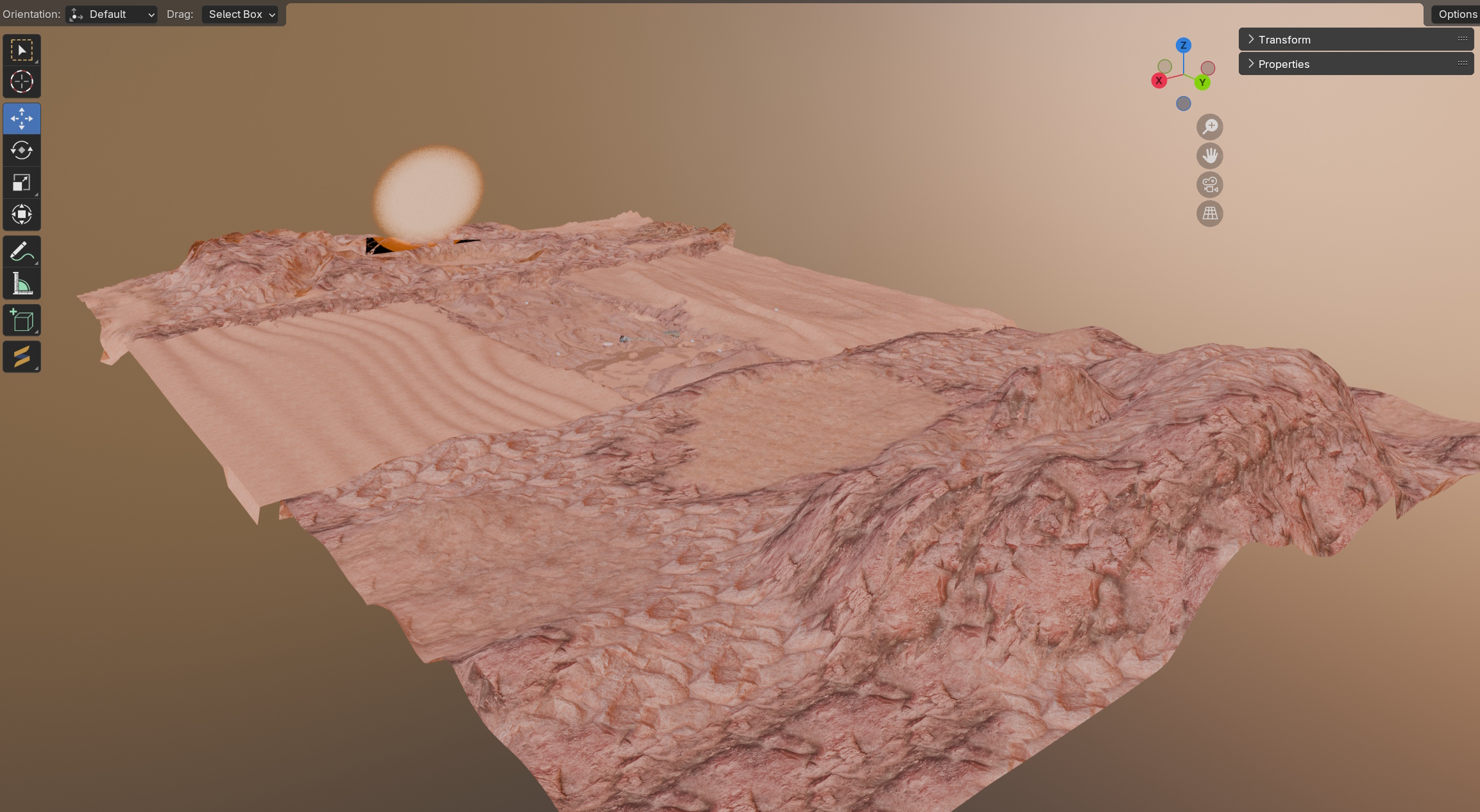
Architecture pieces and the Martian surface itself. Habitat shown as an exploded view straight out of Blender; terrain sculpted and textured for proper rover-friendly footing.

Habitat exploded view
Habitat · exploded view · Blender
Terrain greybox
Terrain textured
Sculpt Textured
Surface terrain
◆ MMC End of manual
Field manual
End of manual

You're ready to launch

Drop in, ensure, toggle, tune. The colony is yours.

Molo Mars Core · v1.0.0 · For FiveM roleplay servers · © Molo Modding 2026
01/05
Singularity
Move to bend space · click to pulse